For Football Manager 27 · macOS
Scout your whole save.
Bootroom opens your FM27 save on your Mac and turns it into a backroom team. Every player, every member of staff and every club is searchable in seconds. It only reads your save and never touches the game.
Free · Public beta 0.9 · macOS 14 Sonoma or later · Apple silicon
- Read-only. Your save file is never modified.
- Hands off the game. No memory reading, no injection.
- Offline. Nothing about your save leaves your Mac.
- Always current. Refreshes each time you save in FM.
The team sheet
Bootroom's starting XI
Eleven things it does for your recruitment. Pick a shirt.
-
1
Every player in your save
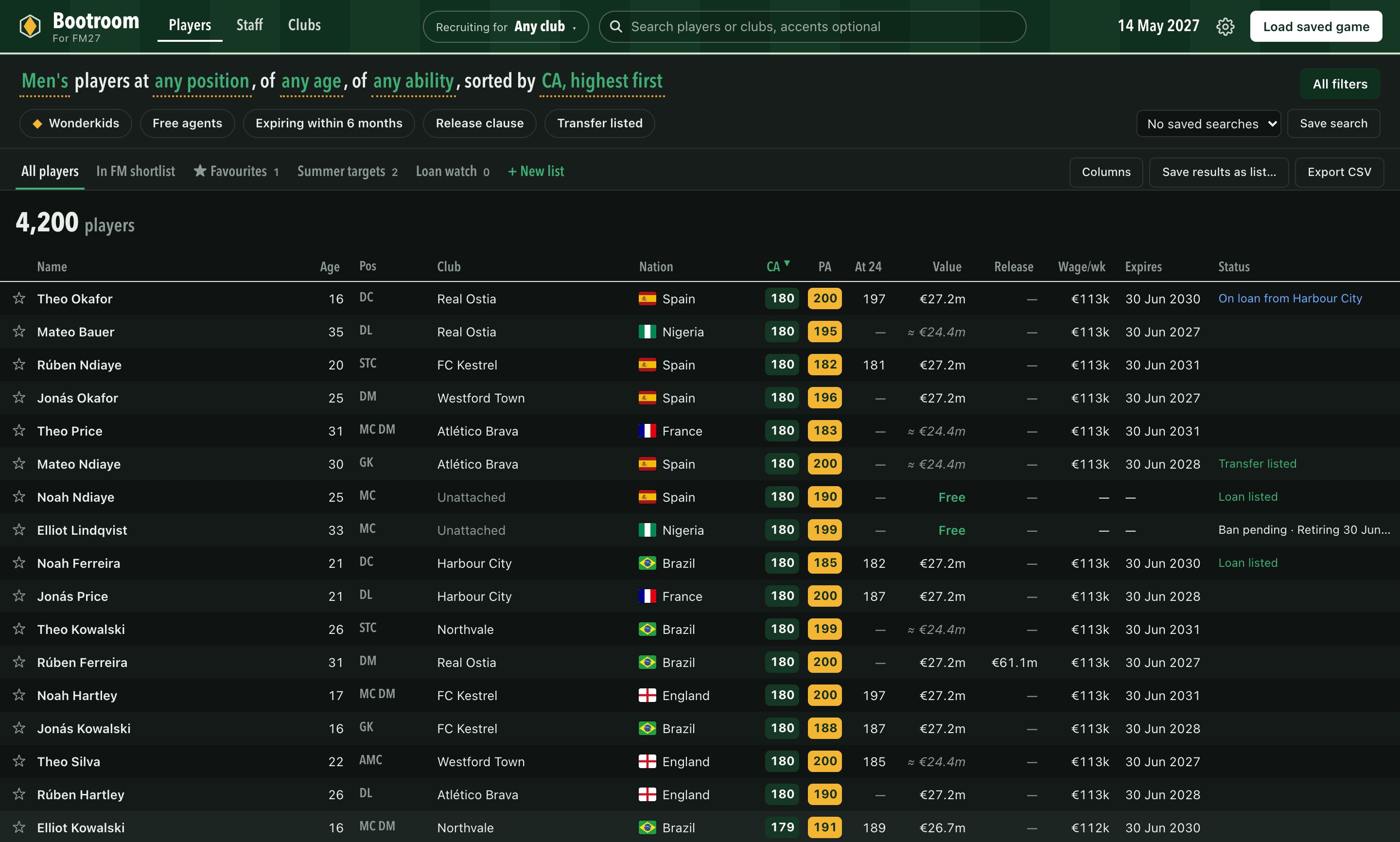
Not just your club or your scouted list. Bootroom reads the whole player database it finds in your save, including the players the game generated, and keeps men's and women's football separate.
- Tens of thousands of players, searchable as you type, accents optional
- Regens marked, so you can include or exclude them
- Male, female or everyone, one click
-
2
Filters that think like a scout
Ask the questions a recruitment team asks. Who is available? Whose contract runs out next summer? Which 19-year-old has PA 150 and a value you can afford?
- Age, current and potential ability, value, wage and contract expiry
- Personality, nationality, injured or banned, transfer- or loan-listed
- Wonderkids in one tick, and searches you can save and reuse
-
3
Lists, notes and careers
Build shortlists with priorities, write notes on players, star your favourites. Everything is kept per career, so two saves never get mixed up, and it survives every refresh.
- Your in-game FM shortlist shows up too
- Save any search's results as a list
- Export every match to CSV for your own spreadsheets
-
4
The player card
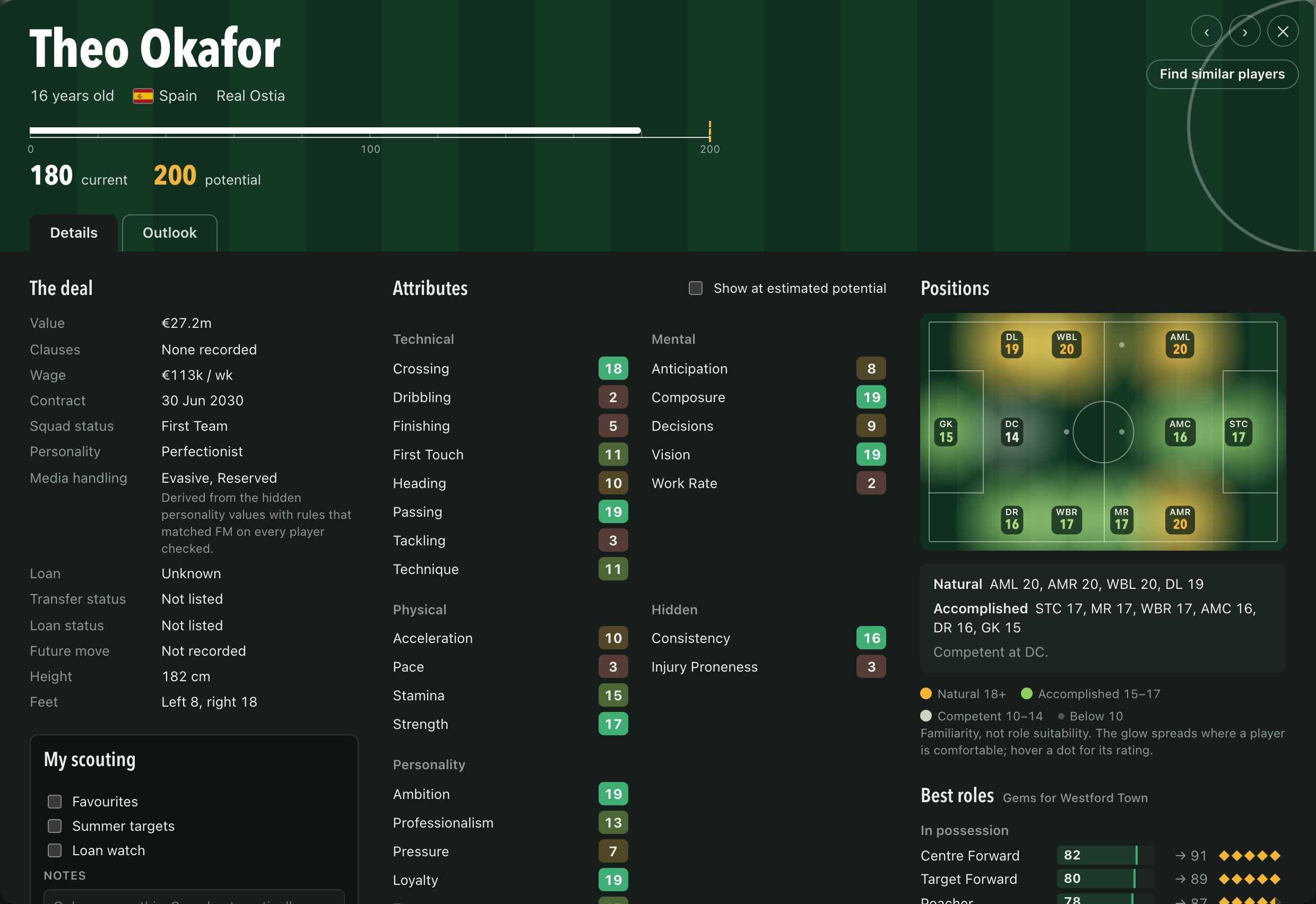
One big card with everything the save knows about a player. Ability sits on a 0–200 chalk rule, attributes are colour-coded tiles, and the positions grid shows familiarity at a glance.
- Hidden attributes and personality, including media handling
- The deal: value, clauses, wage, contract and any future move
- Flick through results without closing it
-
5
Value estimates you can read
Where the save doesn't store a value, Bootroom estimates one from thousands of known values in your own save. It shows a range and how reliable the estimate is, never a single number dressed up as fact.
- Stored values and estimates are always kept apart
- Missing data shows as Unknown, not zero
-
6
All 79 FM27 roles, scored
Every player gets a fit score for each of FM27's in- and out-of-possession roles, weighted by how familiar they are with the position. Filter and sort by any role.
- See a player's best roles now and at their estimated potential
- Hover any score to see the attributes behind it
-
8
Find similar players
Losing your best player? Start from them. Bootroom finds candidates by level (how good they are in the role) and by style (whether they have the same strengths and weaknesses).
- Compare today or at potential
- Only players who can actually play the position
-
10
Potential and development
Switch any card to estimated potential to see how a youngster's attributes could grow. Every time you save, Bootroom records who moved: ability, value and club, so you can follow real development over a career.
- Filter by ability change over the last few months
- A development chart on the player card
-
7
Clubs and a best XI
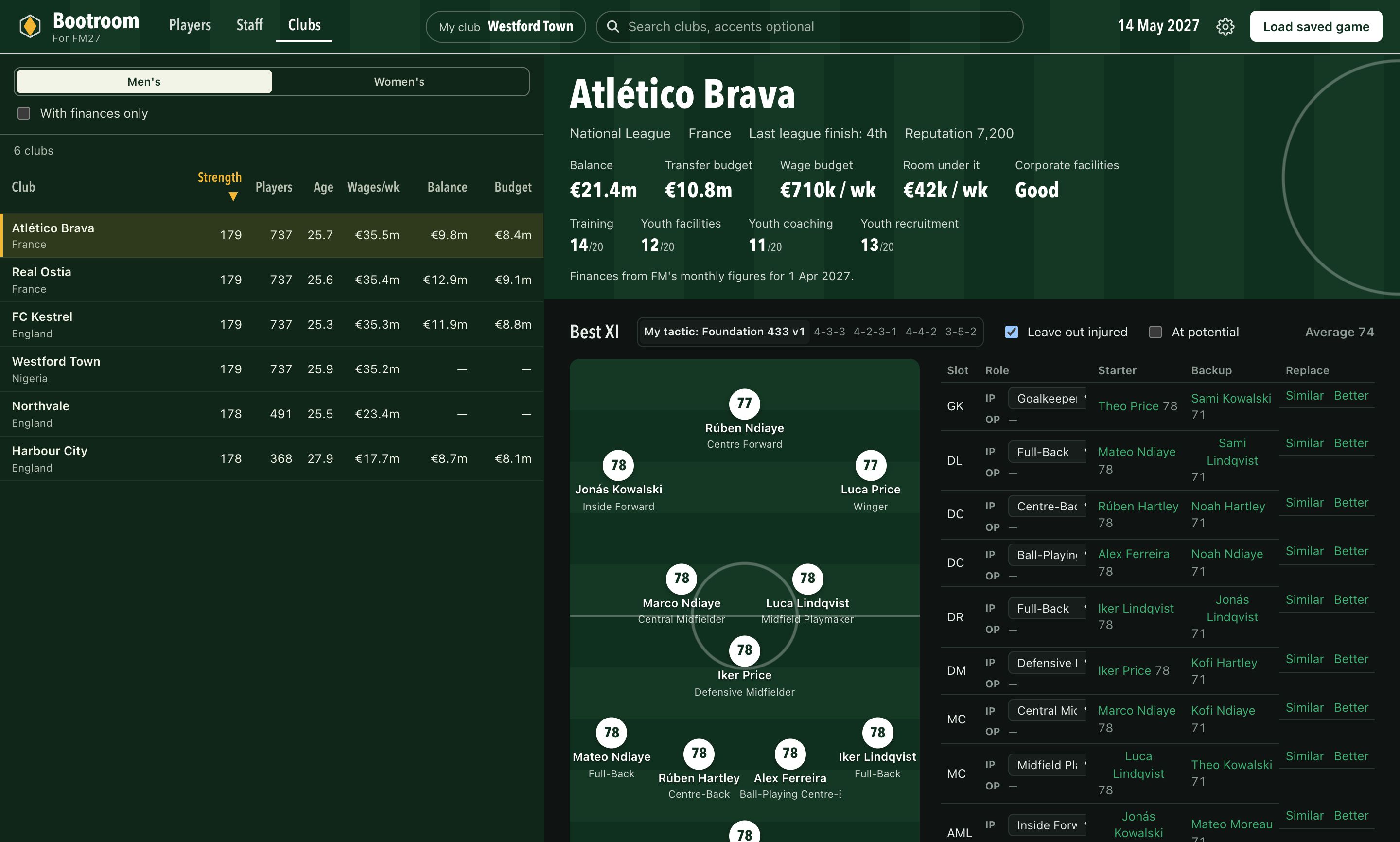
Every club ranked by squad strength, with finances, budgets and facilities. Open a club to see its squad, loans in and out, and the best XI it can field in your own tactic or a stock formation.
- Leave injured players out with one tick
- Search for an upgrade on any position, straight from the team sheet
-
9
Staff search, free agents included
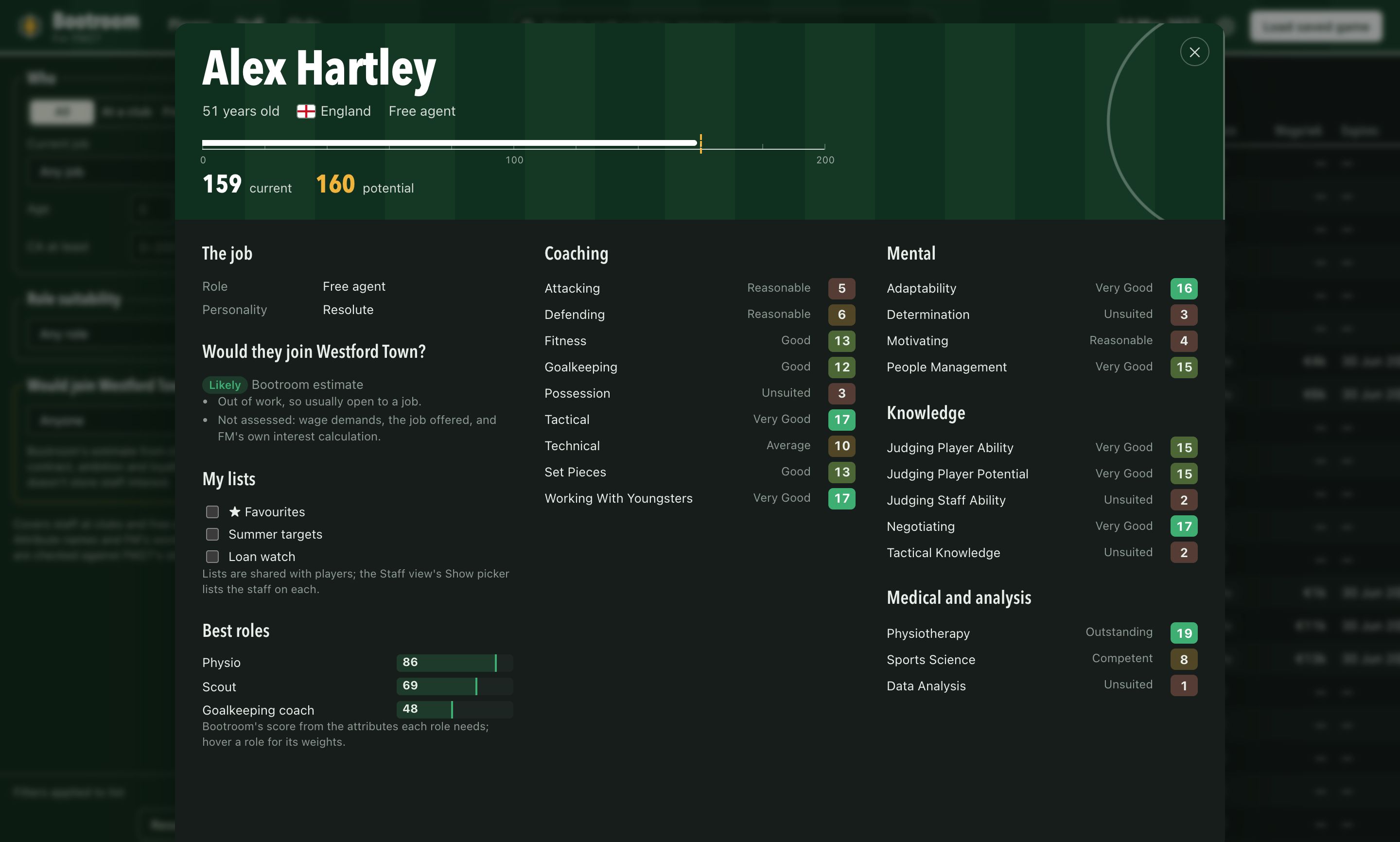
Find your next assistant, coach, scout or physio. Bootroom scores staff for 18 backroom roles and lists everyone, from those employed at clubs to the free agents looking for work.
- Coaching, mental and knowledge attributes in full
- The scoring weights are shown, not hidden
-
11
Keeps up with your save
Leave Bootroom open next to the game. When you save in FM, it notices, takes a fresh private copy and updates, keeping your lists, notes and history intact.
- Works with several careers side by side
- Old snapshots are tidied away automatically
In the room
Built for long sessions
A calm, dense interface that keeps one thing loud: the player you're looking at. Light and dark themes follow your Mac.
Screens show Bootroom's built-in sample data. The names and clubs are made up.
Matchday routine
Three steps, then just keep playing
-
Load a saved game
Choose your
.fmfile. Bootroom takes a private copy, so the original is never opened for writing. -
Let it read the save
Players, staff, clubs and finances are read into a local snapshot on your Mac. No account, no upload.
-
Save in FM as usual
Bootroom spots each new save, refreshes and records who has developed since last time.
Shows its working
Estimates look like estimates

Some things FM keeps to itself. Where Bootroom estimates, it says so, shows the range and explains how. Where it can't read something, it says Unknown rather than guessing.
- Values come with a range and a note on how reliable they are.
- Role and staff scores are Bootroom's own, with the weights shown.
- Stored figures and estimates are never mixed in one column.

Signing day
Scout the next gem
Get the Bootroom beta for Mac. Version 0.9, for Football Manager 27 saves. It was built before the game's full release, so if something looks off, tell us. Version 1.0 follows once it's been checked against the full game.
By downloading Bootroom you agree to its license. See how it handles data in the privacy notice.
Free, always. If it finds you a gem, you can buy us a half-time cuppa.
- macOS
- 14 Sonoma or later
- Chip
- Apple silicon (M1 or newer)
- Game
- Football Manager 27 save files
Opening it for the first time
The beta isn't signed with an Apple developer certificate yet, so macOS asks you to confirm the first launch. Version 1.0 will be signed and notarised by Apple.
- Drag Bootroom into your Applications folder and open it.
- macOS says “Bootroom” Not Opened, because Apple can't check the beta yet. Click Done, not Move to Trash.
- Open System Settings › Privacy & Security, scroll down to Security, and click Open Anyway next to the message about Bootroom.
- Enter your Mac password or use Touch ID, then click Open Anyway once more.
You only need to do this once. The Open Anyway button only appears for about an hour after you try to open Bootroom, so if you don't see it, open Bootroom again first.
Free transfer
Free to use. Fuelled by half-time cuppas.
Bootroom is free, with no adverts and no account. Football Manager updates can change how saves are stored, so keeping it working is ongoing work. If it's helped you find a gem, a small donation keeps the bootroom open.
Your support pays for
- Every FM27 update covered. When a patch changes the save format, Bootroom is updated to match.
- Bug fixes. Reports from the feedback form are worked through and shipped in new versions.
- New features. Many of them come straight from your requests.
- Keeping the app trusted. Apple's yearly developer fee lets us sign Bootroom from version 1.0 and have Apple check it for malware.
Bootroom · Season ticket office
Admit one
half-time cuppa
Pay what you like, once. No account needed.
Bootroom stays free either way.
Press conference
Questions
Can it damage my save?
No. Bootroom reads a private copy of your save and has no code that writes to save files. It doesn't read the game's memory or inject anything into FM, so it can't affect a running game either.
Is it free?
Yes, with no adverts, trial or account. If you'd like to help with updates and new features, you can buy us a half-time cuppa.
Is there a Windows version?
Not at the moment. Bootroom is built for the Mac, where most scouting tools don't run.
Which versions of Football Manager does it support?
Football Manager 27. Older games store their saves differently and aren't supported.
Does it work with women's football?
Yes. Men's and women's players and clubs are kept apart, with a one-click switch between them.
Can I change the app icon?
Yes. Bootroom comes with two: the gem and the scout lens. Pick one under App icon in Bootroom's settings, and the Dock icon changes straight away.

Does it need the internet?
No. Everything happens on your Mac, and nothing from your save is sent anywhere.
Are the numbers the same as FM's?
Ability, attributes, contracts and finances are read straight from the save. Values, role scores and potential projections are Bootroom's own estimates and are labelled that way.
Suggestion box
Tell us what you'd sign next
Found a bug, missing a filter, or want a whole new screen? We read every message. Add your email if you'd like a reply.